Kehidupan hati, adalah sumber dari segala kebaikan. Kematian hati, adalah sumber dari segala keburukan. Hati tidak bisa hidup dan sehat, kecuali dengan menjadikan Allah SWT, sebagai Tuhannya, tujuan hidupnya, dan Sesuatu yang paling dicintainya." (Ibnul Qoyyim Al-Jauziyah)

HOT NEWS

Tampilkan postingan dengan label Software and Aplication. Tampilkan semua postingan

Senin, 02 Mei 2011

Instalasi VirtualBox di Windows 7

Langkah-langkah Installasi VirtualBox di Windows 7

1. Download Aplikasi VirtualBox di alamat resminya virtual box atau di Mirror ini.
2. Double klik atau tekan ENTER dari keyboard setelah dipilih terlebih dahulu untuk memulai proses instalasi, lihat screec short berikut ini:

Dalam pembuatan tutorial ini penulis memakai VirtualBox versi 4.0.4, Maka akan muncul tampilan seperti berikut:


3. Tekan tombol Next untuk melanjutkan proses instalasi.
4. Pada langkah berikut kita dapat menentukan vitur apa saja yang akan kita ikut sertakan atau vitur apa yang akan kita instal, dan kita juga dapat memilih lokasi dimana aplikasi VirtualBox akan diinstal, dalam tutorial ini penulis memilih untuk menginstal vitur dan lokasi secara default, yaitu untuk lokasi berada di drive C:\Program Files. Screen shortnya seperti berikut:

5. Tekan tombol Next untuk melanjutkan atau Cancel untuk membatalkan, kita pilih Next untuk melanjutkan proses instalasi.
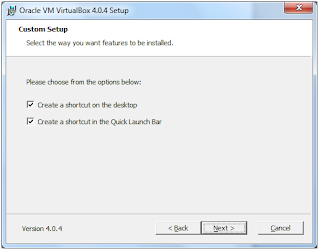
Pada proses ini kita dapat membuat shortcut di desktop dan juga di Quick Lunch Bar dengan cara memberi ceklist pada kedua option tersebut, atau sebaliknya kita tidak menambah shortcut dengan cara kita tidak memberi ceklist pada option tersebut. Dan tekan tombol Next untuk melanjutkan proses berikutnya.
6. Pada proses ini ada peringatan bahwa VirtualBox akan membuat Network Interface secara Virtual juga di dalam PC (komputer,Laptop) yang kita pakai. Pilih Yes untuk menyetujui atau No apabila kita tidak ingin membuatnya, kali ini penulis akan membuat Virtual Network Interface dengan memilih tombol Yes. Lihat Screen short berikut:

7. Tekan tombol Install untuk memulai proses instalasi Network Interface.

Tunggu beberapa saat karena proses instalasi mulai berjalan


8. Setelah proses instalasi Network Inteface berhasil, maka kita diminta untuk melakukan proses instalasi port USB (Universal Serial Bus). Tekan tombol Install apabila kita hendak menambah port USB (virtual) atau tekan tombol Don’t Install apabila kita tidak inign menginstal port USB (virtual). Kali ini penulis memilih Install untuk menambah port USB (virtual). Screen shortnya seperti berikut:

9. Setelah kita meng-install Network Interface dan port USB secara virtual maka kita juga harus meng-instal Network Service-nya, vitur ini berfungsi supaya kita dapat memakai Jaringan Internet layaknya seperti kita memakai sebuah PC/Laptop secara sungguhan. Screen shortnya seperti berikut:

Pilih tombol Install apabila kita hendah meng-install Network Service atau pilih Don’t Install apabila kita tidak ingin meng-installnya.
10. Setelah kita meng-install Network service kita juga meng-install Network Adaptersnya. Screen shortnya seperti berikut:

Pilih tombol Install untuk melakukan proses installasi.
11. Apabila semua sudah terinstall dari tahap demi tahap maka proses instalsi selesai, dan akan muncul tampilan seperti berikut:

Pilih tombol Finish untuk mengakhiri proses installasi, apabila kita akan menjalankan aplikasi VirtualBox secara langsung ketika proses installasi selesai, berilah ceklist pada option Start Oracle VM VirtualBox 4.0.4 after installation. Maka aplikasi VirtualBox akan secara langsung muncul seperti screen short berikut ini:


Oke proses installasi VirtualBox sudah selesai, selamat mencoba, semoga bermanfaat.

DownLoad versi PDF disini

Rabu, 26 Januari 2011

Mematikan MousePad Sewaktu Mengetik

Pernahkah kalian merasa jengkel ketika sedang mengetik pada laptop/netbook untuk ngetik sebuah laporan/artikel/tugas atau yang lain, dan ketika sedang asyik mengetik tanpa melihat layar monitor (karena terlalu ahli dalam ngetik) hehehehe....tanpa kita sadari ternyata tulisan yang kita ketik ga sesuai lagi pada baris yang kita hendaki (tau ga maksudnya gimana..??) saya juga bingung...hehehehe :p

Gini..berdasarkan pengalaman pribadi sering sekali ketika saya sedang asyik-asyiknya ngetik ah tiba-tiba (cursor) yang tadinya di akhir kata/kalimat eh tau-tau pindah ke awal bahkan kadang di tengah-tengah kalimat, wah akhirnya jadi ngedit lagi. (sebel dot com deh).

Nah mungkin ada beberapa jenis laptop/netbook yang sudah dilengkapi dengan fasilitas untuk mengaktifkan dan menonaktifkan "mousepad", kalau sudah ada gampang tinggal kita mau aktifin atau tidak, nah pada kasus pengalaman saya ternyata tidak ada, karena penasaran dan setelah tanya ke beberapa sumber, banyak yang menyarankan untuk menseting dengan melalui CONTRON PANEL --> MOUSE PROPERTIES --> PILIH AKTIF/NONAKTIF. Menurut saya lumayan ribet karena memakan waktu, OKe kalau kita memakainya dalam jangka panjang,nah kalau jangka pendek (tau ga maksudnya..??) hehehehe ya harus klak-klik berulang kali.

Ah jadi kelamaan ngebahas yang ga penting...(Slow Jack..)
Ne saya ada sebuah aplikasi ringan, yah paling cuma berapa KB doang, tapi lumayan maknyus...namanya FREEZER (wah mau bikin ES neh) hehehe namanya bukan FREEZER tapi TOUCHFREEZ nah aplikasi ini saya bilang lumayan bagus karena apa? karena kita ga perlu lagi klik-klak klak-klik lagi, aplikasi tersebut otomatis menyesuaikan ketika kita mengetik, jadi kalau kita ngetik maka MOUSEPAD pada laptop/netbook kita otomatis nonaktif, keren bukan...bagi yang penasaran boleh mencobanya.
Untuk screenshot-nya


DonwLoad aja disini...

NB:
Berdasarkan pengalamam aplikasi ini bekerja pada WINDOWS 7, kalau dari website resminya katanya bisa untuk Windows NT/2000/XP.


ref: http://code.google.com/p/touchfreeze/

Minggu, 27 Juni 2010

Merekam aktivitas Komputer

Ada kalanya kita membutuhkan rekaman tentang suatu kegiatan pada desktop komputer kita, misalnya seorang penulis buku mengenai atau yang berhubungan dengan tutorial, hendak membuat video tentang tutorial yang dibahas dalam bukunya, atau dosen yang hendak membuat tutorial tentang matakuliah yang diampu. Hal ini sangat penting karena lebih mudah untuk mengikuti tutorial yang langsung dilihat secara langsung bagaimana prakteknya daripada sekedar membaca atau mendengarkan saja. Ada berbagai macam aplikasi/software untuk merekam aktivitas desktop komputer dan merekamnya sebagai video. Anda dapat merekam aktivitas desktop komputer ke dalam film untuk membuat demo, tutorial atau bahkan presentasi. Yang Anda butuhkan hanyalah sebuah aplikasi/software, ini salah satu aplikasi/software yang dapat digunakan untuk merekam, aplikasi ini disamping mudah cara penggunaannya, juga sangat kecil kapasitasnya hanya sekitar 1.3 MB. Apabila anda hendak mencoba, silahkan download lalu instal di komputer anda. Apabila aplikasi berhasil diinstal, jalankan aplikasi tersebut, untuk hasil rekaman seluruh layar monitor pilih "Full Screen" pada menu "Region". Klik tombol "Record" atau tekan "F8" pada keyboard, untuk memulai merekam aktivitas desktop Anda, gerakan mouse dan aktivitas lainnya akan terekam. Untuk default file (.AVI) dengan rasio kompresi tertinggi. Untuk menghentikan sejenak (Pause) tekan "F8" pada keyboard.( Tekan F8 untuk Record/Pause )

Untuk menghentikan perekaman setiap saat tekan tombol "F9" pada keyboard. aplikasi ini juga dapat merekam suara bersama dengan gerakan.

Klik disini untuk mendownload aplikasi tersebut. Selamat mencoba.


Jumat, 11 Juni 2010

UltraISO (Handle CD and DVD Images with Ease!)

1. Duplicate Disc to CD/DVD Image
2. Build Files/Folders to One ISO File
3. Organize and Manage Efficiently
4. Edit and Convert ISO File in Many Format
5. Make Bootable CD/DVDs
6. Create/Edit Audio CD Image


Along with the large capacity hard disk popularity, people were already used to copying compact discs to CD/DVD image files, generally used is the famous ISO 9660 international standards format, therefore CD/DVD image files are called ISO files. Because the ISO file retained complete data information of the compact disc (including compact disc boot information), you were allowed the convenience to use commonly used CD/DVD burning software (for example Nero-Burning ROM ) to record the disc with your CD-R/RW or DVD-R/RW over and over forever, it can also be used directly through Virtual CD/DVD-ROM drive software (for example Daemon-Tools or Daemon Tools Pro) .

UltraISO is an ISO CD/DVD image file creating/editing/converting tool and a bootable CD/DVD maker , it can directly edit the CD/DVD image file and extract files and folders from it, as well as directly make ISO files from your CD/DVD-ROM or hard disk. At the same time, you can maintain the ISO bootable information, thus creating your own bootable CD/DVDs. You now have the power to make and edit your own ISO files, and then burn them to CD/DVD for your own needs.

UltraISO is in sole possession of the intellectualized ISO document format analyzer, it can process at the present time almost all types of image files, including ISO and BIN, it may even support new image files which are yet to be created. UltraISO can open these image files, directly extract files and folders, edit it and convert other image files to the standard ISO format.

UltraISO uses the double window unification user contact interface, you have the choice to only use the quick buttons and/or the mouse Drag & Drops, you can handle any CD/DVD image file easily.

System Requirement
  • Windows 7/2008/Vista/2003/XP (32bit and 64bit), Windows 2000, ME, 98SE, 98, or Windows NT4.0 SP6a+ operating system.
  • Intel Pentium 166MHz or above.
  • 64MB memory.
  • At least 10MB free hard disk space.
  • CD-ROM, CD-R/RW, DVD-ROM, the DVD-R/RW driver compact disc image needs).
  • Mouse.
Main Features
  • Can directly edit the ISO image file.
  • Can directly extract files and folders from ISO image file.
  • Can add/delete/create new directory/rename ISO file image content.
  • Can make ISO file from hard disk document.
  • Can create CD/DVD image from CD/DVD-ROM, maintain bootable information.
  • Can process the compact disc boot information, you can directly add/remove/extract boot image of the ISO image.
  • Supports nearly all known CD/DVD image file formats .ISO, .BIN, .IMG, .CIF, .NRG, .MDS, .CCD, .BWI, .ISZ, .DMG, .DAA, .UIF, .HFS and so on), and can convert them to the industry standard and widely supported ISO image format.
  • May directly set the file/folder to hidden attribute
  • Supports ISO 9660 Level1/2/3 and Joliet extension
  • Automatically optimizes the ISO image file structure, saves the disc space.
  • Supports the shell document type integration, Open Image files through double clicking them or the Right Click menu of the mouse with the open dialog.
  • The double window user interface is extremely convenient to use.
  • There are rich add-on tools, you can create ALL in 1 bootable compact discs, CD/DVD image file management, even the virtual CD/DVD drive, those functions are really powerful.
Download this File

Adobe Photoshop Album Starter Edition 3.2 - English

Adobe Photoshop Album Starter Edition 3.2 software is the fun and easy way to find, fix, and share your photos. Find and view photos in a snap. Instantly fix photo flaws in just a click or two. And easily share your memories with family and friends in a slide show with captions, via e-mail, or on a CD.

File Information
Product Photoshop Album
Version 3.2
Platform Windows
File Name Photoshop_albumSE_en_us_320.zip
File Size 7.8MB

System requirements

• Intel Pentium III or 4 500MHz processor
• Microsoft Windows XP (with Service Pack 2) or Windows Vista
• 128MB of RAM (256MB recommended)
• 50MB of available hard-disk space
• Microsoft Internet Explorer 6.0 or later
• Color monitor capable of displaying thousands of colors at a resolution of 800x600
• CD-ROM drive
• Microsoft DirectX 8.1 or 9.0
• QuickTime 6.5.1 software
Adobe Reader 8 software for viewing Adobe PDF slide shows

Installation Instructions

After downloading a ".zip" file, use the operating system or a utility such as WinZip or PKZIP to access the file's contents.

1. Download the application to your local drive and upzip it.
2. Double-click the Photoshop_albumSE_en_us_320.exe file.
3. Follow the onscreen instructions.
4. Start Photoshop Album Starter Edition 3.2. The first time you start the application, you are presented with the Adobe End-User License Agreement window. Click Agree to continue using the application.

Additional notes

If Photoshop Album 2.0/2.1/3.0 Starter Edition is already installed on your computer, Photoshop Album Starter Edition 3.2 will automatically uninstall the earlier version and install the later version.

Photoshop Album Starter Edition 3.2 does not support certain Photoshop Album 1.0 or Photoshop Album 1.0 Starter Edition features such as creations; file formats other than BMP, JPEG, or TIFF; burning to CD or DVD; and the calendar view (only month view is supported). Unsupported features will not show in the Photoshop Album Starter Edition 3.2 catalog. However, if you upgrade to Adobe Photoshop Elements software, all features unsupported in Photoshop Album Starter Edition 3.2 will be carried forward into the Photoshop Elements catalog.

Proceed to Download
Reff: www.adobe.com

Selasa, 25 Mei 2010

Daemon Tools Pro Advanced 4.36.0309


DAEMON Tools Pro Advanced Edition - a program to emulate a virtual drive on the operating systems Windows 2000/XP/Vista (supports both 32 - and 64-bit system). The program installs in the system device driver by which Windows identifies a virtual drive and can work with him as with the usual. The only difference is that instead of these laser disc image files used by CD and DVD-media. DAEMON Tools works through the system tray menu with which you get access to all its commands.

Operating system: Windows ® 2000/XP/Vista/7
Language: Multi (Russian)
Released: 2010
Size: 10.39 Mb
Medicine: Present


Features:
- Automatic updates;
- Creates *. iso and *. mds images by using preset profiles;
- Emulates up to 32 CD / DVD / HD DVD / Blu-ray devices;
- Supports up to 2 IDE devices;
- Burning verify functionality;
- Compression of images;
- Provides the ability to mount an image folder;
- Protects the image of a password;
- Allows you to control image collection;
- Contains a converter;
- Displays properties of virtual devices;
- Provides a friendly user interface.

Key features:
- Auto update;
- Creates *. iso and *. mds images using preset profiles;
- Emulates up to 32 CD / DVD / HD DVD / Blu-ray drives;
- Supports up to two virtual IDE devices;
- Burning verify functionality;
- Compresses images;
- Performs image mounting to physical folders;
- Protects image with password;
- Manages image collection's;
- Includes image converter;
- Monitors virtual devices' properties;
- Offers friendly Graphical User Interface (GUI).

With the new version of DAEMON Tools Pro you can:
Update SPTD to version 1.69,
Work offline (offline) up to 60 days;
Emulate up to 4 IDE devices in addition to 32 SCSI-drive versions of Pro Advanced;
To use the basic functions through a gadget DAEMON Tools in Windows 7 or Windows Vista;
Work through an improved menu and toolbar of the program;
Minimize the program to tray on close;
Create disc images, recorded in the formats MP3, APE, FLAC, etc. with an editor of images;
Use multiseansovy mode for recording discs;
Working in a new Editor interface images;
Install the language pack.

Cusp:
It is based on DT_loader_0.4.exe, DTAgent_loader_0.4.exe, ImgEditor_loader_0.4.exe screwed script for easy installation.
The script copies the loader to the folder Dimon makes backup dtpro.dat (stores in the same folder but with the extension *. bak), adds to the hosts file "127.0.0.1 secure.disc-soft.com", making shortcuts in start-up and the slave . the table "right" (links to the labels are not on the original files, and the loader) "correct" Startup. The tablet runs on Xp, 2003, Vista, 7 (x32/x64). Place the following instructions.
Out Tray Daemon Tools Pro does not run if you do not want sletela registration!
Download: Klik Here

AMS Software Frame Maker Pro 3.67 INCL. SERIAL

AMS Software Frame Maker Pro 3.67 INCL. SERIAL
Frame Maker Pro is an imaging and desktop enhancement software that adds impressive frames to digital photos.

Through its innovative graphical user interface, you can choose from a variety of frames and add them to your images; full screen preview the result; save your framed images in popular formats for use on your projects; print your framed images.

You can create hundreds of original and creative frames and save these frames as presets.

Here are some key features of "Frame Maker Pro":

· User - friendly interface.
· Supports APS, BMP, JPEG, GIF, PNG, WMF, EMF.
· The ability to add simple borders, artistic frames and photo edges.
· Allows to adjust color balance, contrast and brightness.
· Allows to apply special effects (sepia, mosaic, wave, etc.)

DOWNLOAD !!:
Klik Here


ImTOO MP4 Video Converter 6.0.3.0419

ImTOO MP4 Video Converter 6.0.3.0419 | 30 MB
ImTOO MP4 Converter is fast, easy to use MP4 video converter tool which

will help you convert all popular video formats to MP4 (MPEG4), including AVI

to MP4, MPEG to MP4 converter.

ImToo MP4 Converter supports PSP H.264 Codec. In addition, the MP4 video

converter provides a powerful way to convert audio formats to MP3, AAC,

M4A. So easy to use and fast than ever before, just few click to convert AVI

to MP4, MPEG to MP4.

Click to See Wizard Mode ImTOO MP4 Video Converter is an extremely easy

to use MP4 video and audio formats converter. The software makes the

process of converting so many formats a breeze by automating all the tasks

and giving you the best quality.

Convert all popular video formats such as MPEG, WMV, DivX, Xvid, MOV, RM,

AVI to MP4 (MPEG4). You can play video on your portable media player (MP4

player) such as Archos AV500, AV700, Gmini402, iRiver PMP-100, Creative

Zen Vision, PSP, and iPod.

With variable settings and fast converting speed, it is an affordable, high

quality MP4 video encoder.

Two modes are provided: Wizard Mode guiding your whole conversion and

Advanced Mode with variable properties that you can set.

With ImTOO MP4 Video Converter, video encoding just got easier.
Download:
Klik Here


New Java Games (23.05.2010)


New Java Games (23.05.2010)
12 Games | 2010 | 19.6 Mb
Download:
Klik Here

3 New Mobile Games


Platform: java | English | Quantity:3 | 8.6 Mb | Hf
3 New Mobile Games

Facebreaker

Fun Box with a thrilling gameplay and stunning graphics! Each fighter has its own characteristics and style of battle.

Screen size: 128x160, 176x220, 208x208, 240x320, 320x240, 352x416, 360x640, 480x800
Language: English

Domino Story

Help fox over 50 levels add up all the dominoes that fell last bead in the right place.

Screen size: 176x208, 176x220, 240x320
Language: English

Guitar Hero World Tour Backstage Pass

Craps, along with members of your group a tour. Correctly handle the budget for their group and get new orders for concerts. Your task will not only mastering the guitar and drums, but also the vocals.

Screen size: 128x160, 176x220, 240x320, 360x640
Language: English

Download:
Klik Here


Download Racing Java Games Pack


Racing Java Games Pack

45 Games | Java | 2009-2010 | 59 Mb

Composition Build:

1_london-racer-police-madness
3D_Pedrosa_GP
3d_street_racing
3d-motocross
3D-Racing-Evolution
4_wheel_xtreme
african-rally-quad
Andretti_Racing_3D_2009
asphalt
nitro-street-racing2
Formula-Firestorm-Racing
death_race
etc. ..

Format: jar
Quantity: 45 pcs.
Screen size: 128x160 - 240x320
Language: Russian, English
Size: 59 Mb

Download Racing Java Games Pack


Kamis, 20 Mei 2010

Kaspersky Virus Removal Tool 2010 Portable [18.05.2010]


The Kaspersky Virus Removal Tool application was designed to be another virus scanner and detection software from Kaspersky. The product will scan the specified locations for any virus threats and remove them or send to Quarantine folder
Kaspersky Virus Removal Tool - software developed by Kaspersky Labs to provide additional security against malicious programs. Kaspersky AVP Tool finds and cures: viruses, Trojans, worms, spyware and adware, all types of rootkits and similar malicious programs.

Features:
- Excellent detection of malicious programs and strong ability to remove.
- Simple and intuitive interface.
- Can be installed on an infected system (in safe mode).
- Comprehensive testing and treatment: the search for malware signature detection and heuristic analyzer.
- Collect system information and interactive scripting.
- Automatic and manual removal of various types of malicious programs.

Attention:
Kaspersky AVP Tool is designed to quickly find and isolate files, but can not be used as a permanent means of virus protection. To ensure the security of your computer must have to have another "normal" anti-virus with the means of protection in real time.

Kaspersky Virus Removal Tool 2010 Portable [18.05.2010] | 71 MB
To Download Klik Here

Xilisoft Video Converter Ultimate v5.1.39.0409


Xilisoft Video Converter Ultimate is powerful, versatile video conversion software which convert video file between all popular video formats such as convert AVI to MPEG, WMV to AVI, WMV to MPEG, H.264 video, etc. No other program like Xilisoft Video Converter supports so comprehensive video formats including DVD, VCD, SVCD, AVI, MPEG, MP4, WMV, 3GP, H.264/MPEG-4 AVC, H.264/PSP AVC Video, MOV, RM, ASF, FLV, SWF, etc. In addition, The Video Converter provides an easy way to convert video file to popular audio file, like MP2, MP3, AC3, RA, M4A, OGG, AAC etc. The Video Converter also supports APE, CUE decoding and audio CD ripping.

Main Functions:
• Act as 3GP Video Converter, iPod Video Converter, PSP Video Converter, Zune Video Converter, AVI MPEG Converter, MP4 Video Converter, MOV Converter, MKV to MPEG converter, etc.;
• Convert between all popular video formats including AVI, MPEG, WMV, DivX, MP4, H.264/MPEG-4 AVC, RM, MOV, XviD, 3GP, FLV, help you on how to convert AVI to MPEG, convert MKV to AVI, convert MKV to MPEG;
• Convert videos to popular audio files, including MP2, MP3, WMA, WAV, RA, M4A, AAC, AC3, and OGG, and convert between these audio formats;
• Extract pictures from video and output them as JPG, PNG, GIF, BMP, SWF;
• Convert pictures to video formats like AVI, FLV, SWF, MOV, 3GP, WMV, etc.

Key Features:
• Powerful video effect editing functions to customize your video: crop video size, edit video effects, and add video watermark; (Ultimate only)
• Support the decoding and encoding of lossless audio; (Ultimate only)
• Preview and compare the source video and fixed video; (Ultimate only)
• Merge several video segments to one for conversion; (Ultimate and Platinum only)
• Clip segments from video and audio, and output them respectively or merge them into one for output; (Ultimate and Platinum only)
• Preview clipped video segment; (Ultimate and Platinum only)
• More optimized and classified profiles are supported now, and any profile can be customized to create your own one with your favorite settings;
• Customize the output file size and auto-calculate corresponding video bit rate;
• Multiple output formats can be set for one original to facilitate your conversion;
• Convert videos to compatible formats to work on PSP, PS3, iPod, iPhone, Apple TV, Zune, Archos, blackberry, iRiver PMP, Creative Zen, etc.;
• It supports H.264/AVC video format, PSP H.264/MPEG-4 AVC encoding/decoding, PSP H.264/AVC Video (480x272) (*.mp4);
• It provides batch conversion and multithreading, thus you can select multiple files at one time to have them convert one by one automatically;
• You can convert any clip or segment of the video at will by setting the start point and duration, and split one source file to several by duration or file size;
• video codec and audio codec can be modified: alternatively select video codec such as MPEG4, DVvideo, Mjpeg, etc. for AVI, H263, and MPEG4 for 3GP, as well as audio codec like PCM, MP2, MP3, MPEGAAC, AC3, etc.
• When converting files, you can pause, stop and continue at any moment;
• You can keep the default settings or set parameters of the video and audio by yourself to get particular effects for output file.
Xilisoft Video Converter Ultimate v5.1.39.0409 | 24.2MB
To Download Klik Here

Portable Yahoo! Messenger 10.0.0.1267

Yahoo! Messenger is a popular advertisement-supported instant messaging client and associated protocol provided by Yahoo!, that allows you to see when friends come online and to send them instant messages.
It also can alert you to new e-mail in your Yahoo Mail or Yahoo Personals accounts, or when you have upcoming events recorded in your Yahoo Calendar. Yahoo Messenger offers firewall support, a standby mode that minimizes the program until an Internet connection is made, the ability to save and print your conversations, and a tabbed interface that provides quick access to your favorite stocks, news, and sports scores.

Yahoo! Messenger is provided free of charge and can be downloaded and used with a generic "Yahoo! ID" which also allows access to other Yahoo! services, such as Yahoo! Mail, where users can be automatically notified when they receive new email.
Yahoo! also offers PC-PC, PC-Phone and Phone-to-PC service, file transfers, webcam hosting, text messaging service, and chat rooms in various categories.

Other features include the ability to create a chat room automatically, stock price alerts, the ability to send messages to friends (even if they're not online when you are), a Quick Compact mode that hides the Messenger tools to maximize your viewing area, Messenger Themes, and voice chat, which allows you to talk for free to anybody else on the Internet. It also includes Launchcast Radio, Yahoo Games, and Yahoo Audibles. Using a Webcam, you can see who you're chatting with or view the Webcam of any Yahoo member who has granted you access.

Yahoo! has announced a partnership with Microsoft to join their instant messaging networks. This would make Yahoo! Messenger compatible with Microsoft's .NET Messenger Service. It also made Microsoft's Windows Live Messenger compatible with Yahoo!'s Network. This change has taken effect as of 2006-07-13, - Yahoo! Messenger has integrated instant messaging with Windows Live Messenger users, and is fully functional.
Yahoo! Messenger was originally launched under the name Yahoo! Pager on 1998-03-09.

Entertainment
• Photo Sharing. Drag-and-drop photos into your IM windows and talk about them like you're there.
• LAUNCHcast Radio. Make your own radio station and listen to music you like!
• Yahoo! Games. Right in your IM window, challenge friends to a game of backgammon or pool while you catch up.
• IMVironments. Use interactive themed backgrounds in your IMs.

Productivity
• IM Windows Live™ Messenger friends - New! Share IMs (and more), plus see them on your Messenger List.
• Yahoo! Calendar. Stay organized and get calendar alerts.
• Contact Search Bar. Quickly find a contact to IM, call, SMS and more.
• Find, Add, Share Friends. Easily get connected with the people who matter most.
• Yahoo! Search. Find what you need right from your IM window.
• File Transfer. Share files with friends instantly.
• Address Book. Synchronize all your contact information.
• Stealth Settings. Make yourself appear online to some and offline to others.

Personalization
• Plug-ins - New! Add content, services and games to Messenger.
• Sound effects - New! Play fun sounds or a song during PC calls.
• Audibles. Let these animated characters say it out loud for you!
• Emoticons. Express your feelings with these animated smiling faces.
• Yahoo! Avatars. Represent yourself with a stylized graphical image.
• Display Images. Select an image to represent yourself to your friends.
• Skins. Select new visual designs or disable them altogether.

Communication
• Chat Rooms. Join a live, group chat room to discuss a variety of topics.
• Make Calls From Your PC. Make free worldwide PC-to-PC calls, plus free voice mail.
• PC-to-Phone Calls* - New! Call regular and mobile phones for as low as 1?/min.
• Phone-to-PC Calls* - New! Get a phone number for your PC so friends can call you.
• Connect on Yahoo! 360° - New! Stay up to date with friends' blogs, photos, and more.
• Take Yahoo! with You. Send and receive IMs on your mobile phone.
• Webcam. Share live video with friends and family around the world.
• Conference. Exchange text messages with multiple people in one IM.

Portable Yahoo! Messenger 10.0.0.1267 | 14.6MB
To Download Klik Here

Kaspersky Resetter & Key Maniac & Black List Crack & Video


Kaspersky Trial Resetter is the first and only program that is able to reset the license key for all Kaspersky products.
How to:
Follow the next steps to correctly reset the license key for your Kaspersky product.

Disable the Self-Defense. 1
Close your Kaspersky product.
Click on ‘Start Reset’ to begin. 2
Wait for Kaspersky to prompt you to activate.
Activate your product using the online method.

Notes:
The location of Kaspersky’s ‘Self-Defense’ may vary depending on what version of Kaspersky product you are using. If the removal of the old license key fails then log off or restart your computer and try again.
Kaspersky Resetter & Key Maniac & Black List Crack & Video | 11 MB
To Download Klik Here

Sabtu, 24 April 2010

PC Suite Sony Ericsson PC Suite 6.011.00

Sony Ericsson PC Suite connects your phone to your computer so you can manage and backup your personal data, connecting to the internet, handle messages, browse the files on the phone, and more.

Requirements
Select the following connections that are applicable for your phone: USB cable, Infrared or Bluetooth.

System requirements:
  • Windows XP Home, Pro, Media Center (SP3)
  • Windows Vista 32 & 64 bits Ultimate, Enterprise, Business, Home Premium and Home Basic (With or without SP1)
  • Windows 7
  • Pentium II - 233 MHz or more
  • Windows XP: 128 MB RAM
  • Windows Vista: 512 MB RAM
  • 50 MB hard drive space
  • Select the following connections that are applicable for your phone: Connect a USB cable, Infrared or Bluetooth.
To download this application please click here

File size 18.2 Mb
Installation instructions:
  • Download the file to a temporary folder on your PC.
  • You are advised to remove the Sony Ericsson PC Suite already installed a previous version.
  • Execute the downloaded file.
  • If the Sony Ericsson PC Suite update to a newer version, you may need to restart the PC after finished installing the new version.
How to use
Run the program supplied from the folder Start / Programs / Sony Ericsson or the Application Launcher.

Where to install: In Microsoft ® Windows ® computers
Version: 6.011.00
Note:
Sony Ericsson PC Suite is available in the following languages:
• Inggris Amerika
• Arab
• Prancis Kanada
• China Sederhana
• China Tradisional
• Cheska
• Denmark
• Belanda
• Inggris
• Finlandia
• Prancis
• Jerman
• Yunani
• Ibrani
• Hongaria
• Italia
• Jepang
• Spanyol Amerika Latin
• Norwegia
• Polandia
• Portugis
• Rusia
• Spanyol
• Swedia
• Thai
• Turki

Media Settings English Sony Ericsson Media Manager 1.2

With Sony Ericsson Media Manager, you can:
  • Copy audio CDs, convert your existing audio tracks to MP3 or ACC format, add information SenseMe to music and copy tracks directly to Sony Ericsson or Sony Memory Stick phone.
  • View and transfer pictures and videos taken with the phone, resize the image to view more of your favorite photos right on the phone.
  • Subscribe to podcasts and download them to your phone.Create a backup or restore your media content to stay safe.
Requirements
  • Microsoft ® Windows ® XP, SP2 or later (Windows Media Center 2005 or later to file Record TV [dvr-ms]), or Windows Vista.
  • Processor 1 GHz
  • 512 MB RAM
  • 200 MB hard disk space for program installation
  • Sound card compatible with Windows
  • Drive CD-ROM (to remove the audio from CD only)
  • Cable and USB 2.0 ports (for connecting your phone)
  • Internet connection (for Gracenote ® MusicID, software activation and RSS feeds)
  • Microsoft. NET Framework 2.0 (is downloaded automatically if necessary)
  • QuickTime 7.2 or later (the downloaded automatically if necessary)
  • Microsoft MSVC80 (included in installer)
  • Microsoft Windows Installer 3.1 (included in installer)
To download this application please click here


File size 49.6 Mb

Installation instructions
  1. Download the application to a local drive on your computer and note the download location.
  2. Double-click the file. Exe.
  3. Follow the instructions on the screen. In the installation process, you will see the End User License Agreement window. Read it carefully and click Agree to continue the installation.
  4. After installing, run the Media Manager for. The first time you run Media Manager, the screen will show the Media Manager activation and Gracenote CDDB registration number. Both are necessary for using the Media Manager completely. Internet connection required for activation and registration.
Note: Registration can not be done on some special network configurations (eg, corporate networks with very tight security).

How to use
Instructions on how to use Media Manager is available in the Help section marked "?" in the main window of the program.

Where to install: In Microsoft ® Windows ® computers
Version: 1.2
Note:
Sony Ericsson Media Manager is available in the following languages:
• China Sederhana
• China - Tradisional
• Denmark
• Belanda
• Inggris
• Finlandia
• Prancis
• Jerman
• Italia
• Jepang
• Norwegia
• Brasil Portugis
• Rusia
• Spanyol
• Swedia
Media Manager software is not intended and should not be used for purposes that violate the law or cheating, such as unauthorized copying or sharing copyrighted material. Using Media Manager software for such purposes are, among other things, violating the copyright laws of the United States and internationally, and contrary to the End User License Agreement. These activities may be subject to legal action and you also may be subject to infringement claims for compensation outlined in the End User License Agreement.

Sony Ericsson disclaims all legal responsibility for any consequences resulting from using the Media Manager device.

Hamsterku Kelaparan, Kasih makan dong...

 
Design by Wordpress Theme | Bloggerized by Free Blogger Templates | coupon codes